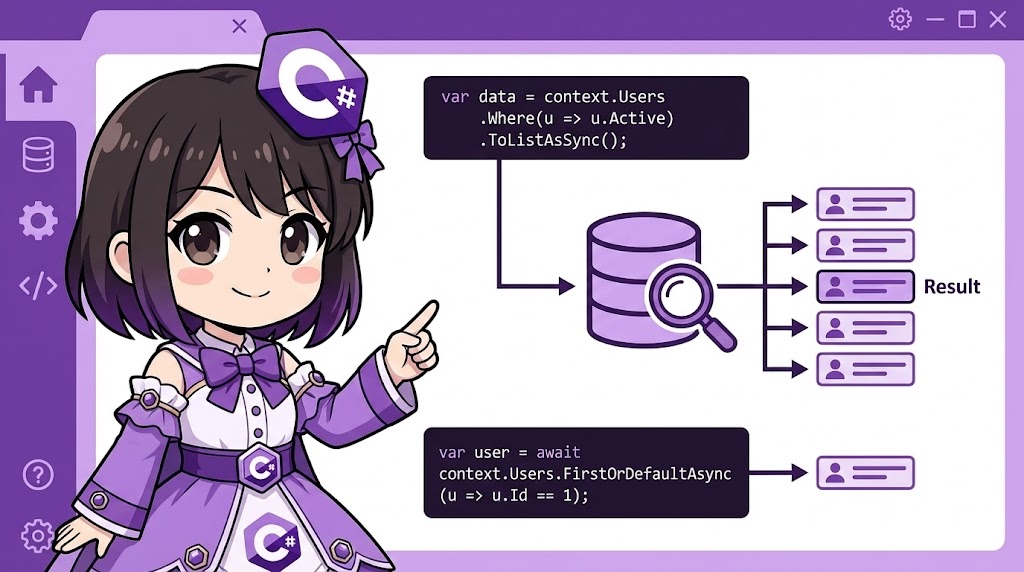
This article explains the basic patterns for retrieving data from a database using Entity Framework Core (EF Core). We will introduce how to implement commonly used queries, such as filtering with the LINQ Where method and searching for a single record using FirstOrDefaultAsync.
Overview
Using EF Core, you can retrieve data from a database using C# syntax. We will cover both retrieving all records and filtering data based on specific criteria to get exactly what you need.
Specifications (Input/Output)
- Input: Search conditions (e.g., ID, name, or numerical range).
- Process:
- ToListAsync: Retrieves all rows matching the condition as a list.
- FirstOrDefaultAsync: Retrieves the first row matching the condition (returns null if not found).
- Where: Defines the search filter.
- Output: Entity objects or a list of objects extracted from the database.
Basic Usage
You can build queries using extension methods from the System.Linq namespace and execute them using asynchronous methods.
// Retrieve a list of items matching a condition (e.g., Price is 1000 or more)
var expensiveItems = await context.Items
    .Where(i => i.Price >= 1000)
    .ToListAsync();

// Retrieve exactly one item that matches an ID
var item = await context.Items
    .FirstOrDefaultAsync(i => i.Id == 5);
Full Code Example
The following code is a complete console application for a system managing “Customers” and “Orders” in an e-commerce site. It demonstrates data extraction based on different conditions. Initial data is automatically added when executed for demonstration purposes.
Note: Requires the Microsoft.EntityFrameworkCore.InMemory package. dotnet add package Microsoft.EntityFrameworkCore.InMemory
using System;
using System.Collections.Generic;
using System.Linq;
using System.Threading.Tasks;
using Microsoft.EntityFrameworkCore;

namespace QueryDataSample
{
    // 1. Entity class definitions
    public class Customer
    {
        public int Id { get; set; }
        public string Name { get; set; } = string.Empty;
        public string Email { get; set; } = string.Empty;

        // One customer has multiple orders
        public List<Order> Orders { get; set; } = new List<Order>();
    }

    public class Order
    {
        public int Id { get; set; }
        public DateTime OrderDate { get; set; }
        public decimal TotalAmount { get; set; }

        public int CustomerId { get; set; }
        public Customer? Customer { get; set; }
    }

    // 2. DbContext definition
    public class ShopContext : DbContext
    {
        public DbSet<Customer> Customers { get; set; }
        public DbSet<Order> Orders { get; set; }

        protected override void OnConfiguring(DbContextOptionsBuilder optionsBuilder)
        {
            optionsBuilder.UseInMemoryDatabase("ShopDb");
        }
    }

    class Program
    {
        static async Task Main(string[] args)
        {
            // Seed initial data
            await SeedDataAsync();

            using (var context = new ShopContext())
            {
                Console.WriteLine("=== 1. Retrieve All Records ===");
                // Load all data into memory using ToListAsync
                var allCustomers = await context.Customers.ToListAsync();
                foreach (var c in allCustomers)
                {
                    Console.WriteLine($"ID: {c.Id}, Name: {c.Name}");
                }

                Console.WriteLine("\n=== 2. Retrieve One Matching Record (FirstOrDefault) ===");
                // Search for a customer with the name "Alice"
                var targetCustomer = await context.Customers
                    .FirstOrDefaultAsync(c => c.Name == "Alice");

                if (targetCustomer != null)
                {
                    Console.WriteLine($"Found: {targetCustomer.Name} ({targetCustomer.Email})");
                }
                else
                {
                    Console.WriteLine("Not Found.");
                }

                Console.WriteLine("\n=== 3. Filtered Search (Where) ===");
                // Search for orders where the amount exceeds 5000
                var highValueOrders = await context.Orders
                    .Where(o => o.TotalAmount > 5000m)
                    .ToListAsync();

                foreach (var order in highValueOrders)
                {
                    Console.WriteLine($"Order ID: {order.Id}, Amount: {order.TotalAmount:C}, Date: {order.OrderDate:d}");
                }
            }
        }

        // Helper method for seeding data
        static async Task SeedDataAsync()
        {
            using (var context = new ShopContext())
            {
                if (await context.Customers.AnyAsync()) return;

                var c1 = new Customer { Name = "Alice", Email = "alice@test.com" };
                var c2 = new Customer { Name = "Bob", Email = "bob@test.com" };

                context.Customers.AddRange(c1, c2);
                await context.SaveChangesAsync();

                context.Orders.AddRange(
                    new Order { CustomerId = c1.Id, TotalAmount = 1200m, OrderDate = DateTime.Now.AddDays(-10) },
                    new Order { CustomerId = c1.Id, TotalAmount = 8500m, OrderDate = DateTime.Now.AddDays(-5) },
                    new Order { CustomerId = c2.Id, TotalAmount = 600m,  OrderDate = DateTime.Now.AddDays(-1) }
                );
                await context.SaveChangesAsync();
            }
        }
    }
}
Execution Result Example
=== 1. Retrieve All Records ===
ID: 1, Name: Alice
ID: 2, Name: Bob

=== 2. Retrieve One Matching Record (FirstOrDefault) ===
Found: Alice (alice@test.com)

=== 3. Filtered Search (Where) ===
Order ID: 2, Amount: $8,500.00, Date: 2026/01/07
Customization Points
- Optimizing Primary Key Search: When searching by ID (Primary Key), using the
Find(orFindAsync) method can be faster because it prioritizes checking the context cache first.C#var user = await context.Users.FindAsync(10); - Speeding Up Read-Only Queries: If you only plan to display data and not update it, adding
AsNoTracking()improves performance by removing the overhead of change tracking.C#var logs = await context.Logs.AsNoTracking().ToListAsync();
Important Notes
- Client vs. Server Evaluation: If you use custom C# methods (e.g.,
String.Formator your own functions) inside aWhereclause, EF Core may not be able to convert them to SQL. This might cause it to load all data into memory before filtering, which slows down performance. Always use primitive types and standard operators for search conditions. - NULL Checks:
FirstOrDefaultAsyncreturnsnullif no matching data is found. Always perform a null check before accessing the return value. (Methods likeSingleAsyncwill throw an exception if no record is found.) - Execution Timing: Simply writing a
Whereclause does not execute a SQL query. The query is only sent to the database when you call a termination method likeToListAsync,FirstOrDefaultAsync, orCountAsync(Deferred Execution).
Variations (Optional)
Combining Multiple Conditions
You can build complex queries using AND (&&) and OR (||) operators.
// Orders for "Alice" that occurred in 2025 or later
var specificOrders = await context.Orders
    .Where(o => o.Customer.Name == "Alice" && o.OrderDate.Year >= 2025)
    .OrderByDescending(o => o.OrderDate) // Sort by newest date first
    .ToListAsync();
Summary
- It is important to write search conditions using expressions that can be converted to SQL so they execute on the database server.
- Use
Where+ToListAsyncto retrieve multiple rows. - Use
FirstOrDefaultAsyncfor single-row retrieval and remember to perform a null check.