Overview
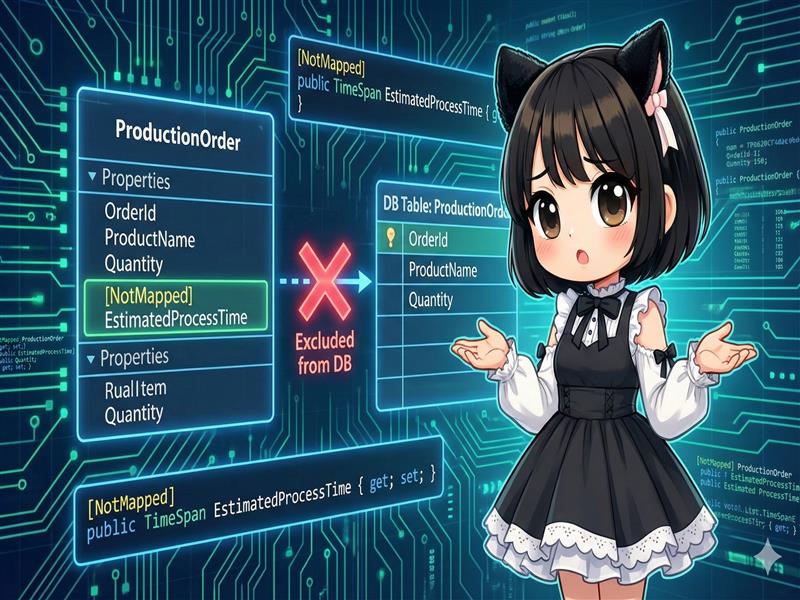
When designing entities with Entity Framework Core (EF Core), you might want to prevent certain properties in a class from being created as columns in a database table. This guide explains how to use the [NotMapped] attribute from Data Annotations to exclude temporary calculation results or UI display flags from database management.
Specifications
- Input: A property defined in an entity class.
- Process: Apply the
[NotMapped]attribute to the target property. - Output: The property is ignored during database operations such as SELECT, INSERT, and UPDATE.
Basic Usage
Use the System.ComponentModel.DataAnnotations.Schema namespace and apply the attribute to the property.
[NotMapped]
public string TemporaryMessage { get; set; }
Full Code Example
The following code is a complete console application example that uses the EF Core In-Memory database. You can see that even after saving data, the value of EstimatedProcessTime is not persisted and returns to its default value when reloaded.
Note: Requires the Microsoft.EntityFrameworkCore.InMemory package. dotnet add package Microsoft.EntityFrameworkCore.InMemory
using System;
using System.ComponentModel.DataAnnotations;
using System.ComponentModel.DataAnnotations.Schema;
using System.Linq;
using Microsoft.EntityFrameworkCore;

namespace NotMappedSample
{
    // 1. Entity class definition
    public class ProductionOrder
    {
        [Key]
        public int OrderId { get; set; }

        public string ProductName { get; set; } = string.Empty;

        public int Quantity { get; set; }

        // This property will not be created in the database table.
        // It is used for temporary calculations or display within the application.
        [NotMapped]
        public TimeSpan EstimatedProcessTime { get; set; }
    }

    // 2. DbContext definition
    public class FactoryContext : DbContext
    {
        public DbSet<ProductionOrder> Orders { get; set; }

        protected override void OnConfiguring(DbContextOptionsBuilder optionsBuilder)
        {
            // Use in-memory database for testing
            optionsBuilder.UseInMemoryDatabase("FactoryDb");
        }
    }

    class Program
    {
        static void Main(string[] args)
        {
            // Saving data
            using (var context = new FactoryContext())
            {
                var newOrder = new ProductionOrder
                {
                    ProductName = "Widget-X",
                    Quantity = 100,
                    // Set the value in memory
                    EstimatedProcessTime = TimeSpan.FromHours(2.5)
                };

                context.Orders.Add(newOrder);
                context.SaveChanges();

                Console.WriteLine($"[At Saving] ID: {newOrder.OrderId}, EstimatedProcessTime: {newOrder.EstimatedProcessTime}");
            }

            // Loading data
            using (var context = new FactoryContext())
            {
                var savedOrder = context.Orders.FirstOrDefault();

                if (savedOrder != null)
                {
                    Console.WriteLine("--- Reloading from Database ---");
                    Console.WriteLine($"[At Loading] ID: {savedOrder.OrderId}, Name: {savedOrder.ProductName}");

                    // Because of the NotMapped attribute, it is not saved in the DB.
                    // It returns to the default value (TimeSpan.Zero).
                    Console.WriteLine($"[At Loading] EstimatedProcessTime: {savedOrder.EstimatedProcessTime}");
                }
            }
        }
    }
}
Execution Results Example
[At Saving] ID: 1, EstimatedProcessTime: 02:30:00
--- Reloading from Database ---
[At Loading] ID: 1, Name: Widget-X
[At Loading] EstimatedProcessTime: 00:00:00
Customization Points
- Calculated Properties: Properties with only a getter (e.g.,
public int Total => Price * Count;) are often ignored automatically by EF Core. However,[NotMapped]is useful if a setter exists or if you want to explicitly exclude it. - UI State Flags: This is ideal for properties used in client-side applications like WPF or Blazor, such as row selection states (
IsSelected) or expansion states (IsExpanded).
Important Notes
- Not Supported in LINQ Queries: You cannot use properties marked with
[NotMapped]in theWhereclause of a LINQ to Entities query. This causes a runtime exception because the property cannot be converted to SQL. Always use columns that exist in the database for queries. - Data Loss: As explained, values are lost once the context is disposed and reloaded. Never use this for data that requires persistence.
- Impact on Migrations: If you add this attribute to a property that already exists as a column in the database, running a migration will generate SQL to delete that column. Be careful as this will result in data loss.
Variations
Using Fluent API
If you want to keep your entity classes clean (POCO), you can configure this in the OnModelCreating method instead of using attributes.
protected override void OnModelCreating(ModelBuilder modelBuilder)
{
    modelBuilder.Entity<ProductionOrder>()
        .Ignore(p => p.EstimatedProcessTime);
}
Summary
Apply [NotMapped] to properties that you do not want to match with database table columns. This is suitable for temporary calculated values, UI state management, or temporary data for logging. Ensure you do not use these properties as search conditions in LINQ queries.