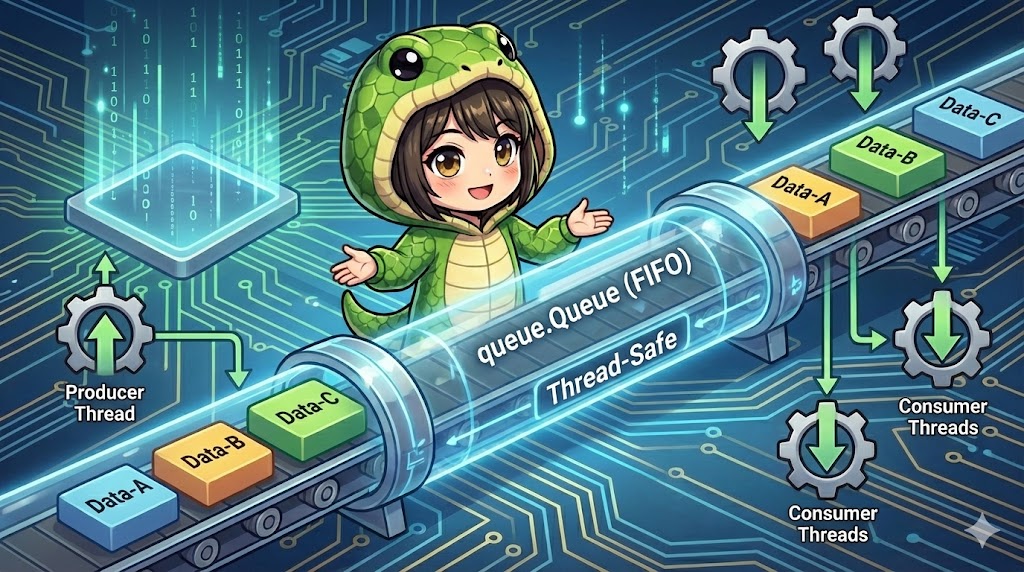
Overview
The queue module in Python provides a mechanism to safely exchange (communicate) data between threads in multi-threaded programming. If you operate standard data structures like a list across multiple threads simultaneously, data corruption can occur. However, queue.Queue handles exclusive control internally, allowing you to add and retrieve data safely without explicitly writing locks.
Specifications (Input/Output)
- Input: Any Python object (data).
- Output: Data retrieval following the stored order.
- Features:
- FIFO (First-In, First-Out): The first data added is the first to come out (like a waiting line).
- Thread-Safe: Consistency is maintained even if multiple threads perform
putorgetat the same time. - Blocking: If you call
get()when the queue is empty, the thread can wait until data becomes available.
List of Methods and Processes
| Method / Syntax | Arguments (Example) | Description / Meaning |
queue.Queue(maxsize) | maxsize=0 | Creates a queue object. maxsize sets a capacity limit (0 is unlimited). |
q.put(item) | item, timeout=None | Adds data to the queue. If the queue is full, it waits (blocks) until space is available. |
q.get() | timeout=None | Retrieves data from the queue. If the queue is empty, it waits (blocks) until data is added. |
q.qsize() | None | Returns the approximate number of items currently in the queue. |
q.empty() | None | Returns True if the queue is empty. |
q.full() | None | Returns True if the queue is full. |
Basic Usage
This code demonstrates the basic FIFO behavior in a single-threaded environment.
import queue

# Create a queue
q = queue.Queue()

# Add data (Put)
q.put("Data-A")
q.put("Data-B")
q.put("Data-C")

print(f"Current size: {q.qsize()}")

# Retrieve data (Get)
# Data is retrieved in the order it was added (A -> B -> C)
while not q.empty():
    data = q.get()
    print(f"Retrieved: {data}")
Full Code
This example shows how to use the queue in a multi-threaded environment. It implements the common “Producer-Consumer” pattern, where one thread generates data and others process it.
import threading
import queue
import time
import random

def producer(q, count):
    """Thread process that generates data and adds it to the queue."""
    print("[Producer] Starting data generation")
    for i in range(count):
        item = f"Order-{i}"

        # Simulating generation time
        time.sleep(random.uniform(0.1, 0.5))

        # Add to the queue
        q.put(item)
        print(f"  [Producer] Put -> {item} (QSize: {q.qsize()})")

    print("[Producer] Finished generating all data")

def consumer(q, thread_name):
    """Thread process that retrieves and processes data from the queue."""
    print(f"[{thread_name}] Starting wait")
    while True:
        try:
            # Get data from the queue
            # timeout=3: Stop if no data arrives for 3 seconds
            item = q.get(timeout=3)

            print(f"    [{thread_name}] Get <- {item}")

            # Simulating processing time
            time.sleep(random.uniform(0.2, 0.8))

            # Notify that the task is done (standard practice)
            q.task_done()

        except queue.Empty:
            # Exit loop on timeout
            print(f"[{thread_name}] No more data. Exiting.")
            break

if __name__ == "__main__":
    # Create a thread-safe queue
    my_queue = queue.Queue()

    # Create producer thread
    p_thread = threading.Thread(target=producer, args=(my_queue, 5))

    # Create two consumer threads for parallel processing
    c_threads = []
    for i in range(2):
        t = threading.Thread(target=consumer, args=(my_queue, f"Consumer-{i}"))
        c_threads.append(t)

    # Start threads
    p_thread.start()
    for t in c_threads:
        t.start()

    # Wait for all threads to finish
    p_thread.join()
    for t in c_threads:
        t.join()

    print("All processes completed")
Customization Points
Controlling Blocking
By default, put and get will block until the operation can be completed. This can be controlled with arguments:
q.get(block=False)orq.get_nowait(): Does not wait. If the queue is empty, it immediately raises aqueue.Emptyexception.q.get(timeout=5): Waits for a maximum of 5 seconds. If still empty, it raises aqueue.Emptyexception.
Different Types of Queues
The queue module provides other useful types of queues besides FIFO:
queue.LifoQueue: LIFO (Last-In, First-Out). A stack structure where the last item added is the first to be retrieved.queue.PriorityQueue: A priority queue. Data is added as a tuple(priority, data). Items are retrieved in order of their priority (the lowest number is retrieved first).
Important Notes
Reliability of qsize()
In a multi-threaded environment, even if q.qsize() > 0 is confirmed, another thread might call get() immediately after, making the queue empty. Therefore, writing if not q.empty(): data = q.get() is not perfectly safe. Always call q.get() directly to wait, or use try-except queue.Empty for proper error handling.
Storing None
You can store any object in the queue, including None. Conventionally, None is often used as a “Sentinel (termination signal).” A producer puts None into the queue, and when the consumer receives None, it knows to exit the loop.
Advanced Usage
This pattern uses task_done() and join() to make the main thread wait until all tasks in the queue are “fully processed.”
import threading
import queue

def worker(q):
    while True:
        item = q.get()
        if item is None: # Termination signal
            q.task_done()
            break
        print(f"Processing: {item}")
        # Notify the queue that processing is finished
        q.task_done()

q = queue.Queue()
t = threading.Thread(target=worker, args=(q,))
t.start()

# Submit tasks
for i in range(5):
    q.put(i)

# Block until all tasks are marked as finished with task_done()
q.join()

# Stop the thread
q.put(None)
t.join()
Summary
If you need to exchange data between multiple threads, consider using queue.Queue before writing your own complex lock logic. It allows you to decouple the “sender” and “receiver,” resulting in a safe and concise asynchronous implementation.