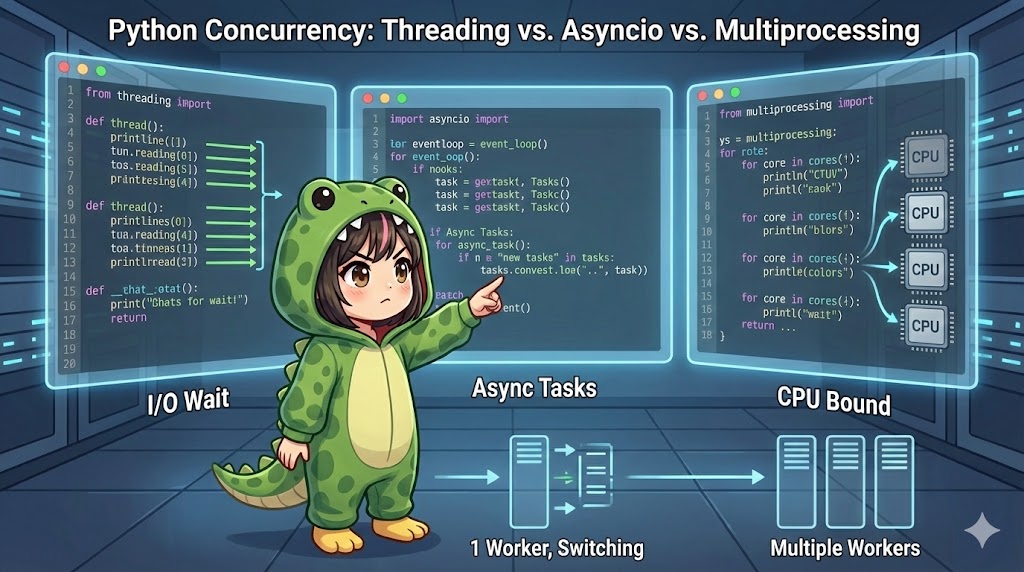
Overview
This article explains three approaches to making your Python code faster and more efficient: Multithreading, Multiprocessing, and Asynchronous programming (async/await). While all three are technologies for “handling multiple tasks at once,” they excel in completely different situations. We will introduce the basic code and logic to help you understand their mechanisms and how to choose the right one for your needs.
Specifications (Input/Output)
- Input: None (tasks are executed using each method).
- Output: Task execution logs and processing time.
- Requirements: Uses standard libraries
threading,multiprocessing, andasyncio. Python 3.7 or higher is recommended.
Basic Usage
Here are the conceptual differences and coding styles for the three methods.
1. Multithreading (threading)
Imagine a single worker who performs another task (like checking emails) while waiting for something else (like waiting for a microwave to finish). This is best for I/O-bound tasks, such as waiting for network responses or reading files.
import threading
import time

def task(name):
    print(f"{name} started")
    time.sleep(2) # Simulating a wait (like network communication)
    print(f"{name} completed")

# Create two threads
t1 = threading.Thread(target=task, args=("Thread-A",))
t2 = threading.Thread(target=task, args=("Thread-B",))

t1.start()
t2.start()

# Wait for both threads to finish
t1.join()
t2.join()
2. Asyncio (async/await)
Imagine a single worker following instructions from a conductor (the event loop) to switch between tasks at high speed. This is more memory-efficient than multithreading and is ideal for web servers or crawlers that handle a massive number of simultaneous connections.
import asyncio

async def task(name):
    print(f"{name} started")
    await asyncio.sleep(2) # Non-blocking wait
    print(f"{name} completed")

async def main():
    # Schedule two tasks to run concurrently
    await asyncio.gather(
        task("Async-A"),
        task("Async-B")
    )

if __name__ == "__main__":
    asyncio.run(main())
3. Multiprocessing (multiprocessing)
Imagine hiring two workers instead of one. This allows you to fully utilize multiple CPU cores, making it suitable for CPU-bound tasks with high loads, such as numerical calculations or image processing.
import multiprocessing
import time

def task(name):
    print(f"{name} started")
    # Simulate heavy CPU processing
    _ = [i**2 for i in range(10000000)]
    print(f"{name} completed")

if __name__ == "__main__":
    # if __name__ == "__main__" is required on Windows
    p1 = multiprocessing.Process(target=task, args=("Process-A",))
    p2 = multiprocessing.Process(target=task, args=("Process-B",))

    p1.start()
    p2.start()

    p1.join()
    p2.join()
Full Code
This code compares the three methods by executing tasks suited to their characteristics (I/O-bound vs. CPU-bound) to demonstrate the differences in performance.
import time
import threading
import multiprocessing
import asyncio

# --- Task Definitions ---

def heavy_calculation():
    """CPU-bound task: Calculation"""
    # Perform a heavy calculation
    sum([i**2 for i in range(10**6)])

def io_waiting():
    """I/O-bound task: Waiting"""
    # Sleep to simulate waiting for communication
    time.sleep(1)

async def async_io_waiting():
    """Asynchronous I/O task"""
    await asyncio.sleep(1)

# --- Execution Function Definitions ---

def run_multithreading():
    """Execute I/O tasks using Multithreading"""
    start = time.time()
    threads = []
    for _ in range(4):
        t = threading.Thread(target=io_waiting)
        threads.append(t)
        t.start()

    for t in threads:
        t.join()
    print(f"[Multi-Thread] I/O Task (4 times): {time.time() - start:.4f} seconds")

def run_multiprocessing():
    """Execute calculations using Multiprocessing"""
    start = time.time()
    processes = []
    for _ in range(4):
        p = multiprocessing.Process(target=heavy_calculation)
        processes.append(p)
        p.start()

    for p in processes:
        p.join()
    print(f"[Multi-Process] Calculation (4 times): {time.time() - start:.4f} seconds")

async def run_asyncio():
    """Execute I/O tasks using Asyncio"""
    start = time.time()
    tasks = [async_io_waiting() for _ in range(4)]
    await asyncio.gather(*tasks)
    print(f"[Asyncio     ] I/O Task (4 times): {time.time() - start:.4f} seconds")

def run_normal_calculation():
    """For comparison: Calculation in a normal loop"""
    start = time.time()
    for _ in range(4):
        heavy_calculation()
    print(f"[Normal Loop ] Calculation (4 times): {time.time() - start:.4f} seconds")

if __name__ == "__main__":
    print("--- Concurrency Comparison Benchmark ---")

    # 1. Multithreading (Strong for I/O waiting)
    # Even with 4 sleeps of 1 second, it should finish in about 1 second due to concurrency.
    run_multithreading()

    # 2. Asyncio (Strong for I/O waiting)
    # This should also finish in about 1 second. Lower overhead than threads.
    asyncio.run(run_asyncio())

    # 3. Multiprocessing (Strong for CPU tasks)
    # If there are 4 cores, this should be faster than sequential execution.
    run_multiprocessing()

    # 4. Normal Execution (For comparison)
    # Takes longer because it runs sequentially.
    run_normal_calculation()
Customization Points
The following table compares the characteristics of each method.
| Feature | Multithreading | async/await | Multiprocessing |
| Module | threading | asyncio | multiprocessing |
| Memory Space | Shared | Shared | Independent |
| Best For | I/O waits (Network, DB) | I/O waits (Massive connections) | CPU calculations (Analysis) |
| CPU Parallelism | No (Limited to 1 core by GIL) | No (1 core) | Yes (Uses multiple cores) |
| Implementation | Low to Medium | Medium to High | Medium |
GIL (Global Interpreter Lock): Due to Python’s (CPython) design, even with multithreading, only one CPU instruction can run at a time. Therefore, adding threads does not increase calculation speed. If you want to speed up calculations, “Multiprocessing” is the only option.
Important Notes
if __name__ == "__main__": in Multiprocessing
When using multiprocessing on Windows, you must wrap your code in this block. Otherwise, processes will be created infinitely, causing the system to crash.
Race Conditions
Since multithreading shares memory variables, data can become corrupted if multiple threads write to the same location at once. You must use synchronization primitives like Lock.
“Blocking” in Async
If you use time.sleep() or perform heavy calculations inside an async function, the entire event loop will stop. This negates the benefits of asynchronous programming. Always use await asyncio.sleep() and avoid heavy CPU tasks in the main event loop.
Advanced Usage
You can use the concurrent.futures module for a more modern and user-friendly implementation. This allows you to switch between threads and processes by simply changing the class name.
from concurrent.futures import ThreadPoolExecutor, ProcessPoolExecutor
import time

def task(n):
    time.sleep(1)
    return n * n

if __name__ == "__main__":
    # You can switch between ThreadPoolExecutor and ProcessPoolExecutor
    # Use ThreadPoolExecutor for I/O-bound tasks
    # Use ProcessPoolExecutor for CPU-bound tasks
    with ThreadPoolExecutor(max_workers=3) as executor:
        results = list(executor.map(task, [1, 2, 3, 4, 5]))

    print(f"Results: {results}")
Summary
- Many network/wait tasks →
asyncioorthreading - Heavy calculation/aggregation →
multiprocessing - Easy parallelization →
concurrent.futures
The key to concurrency in Python is identifying whether your task is “I/O-bound” or “CPU-bound.” Choose the method that best fits your purpose.